


.png?lmsauth=fe6600bdab0aafc21e4a67526017a8ded0be21f5)
I don’t know my login credentials
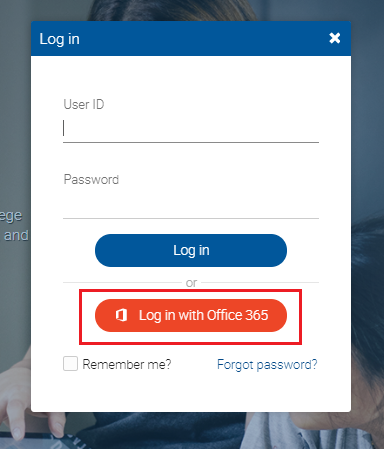
You can login to your Microsoft Office 365, eLearning Management System (eLMS), and One STI Student Portal accounts using your STI Microsoft O365 email address.
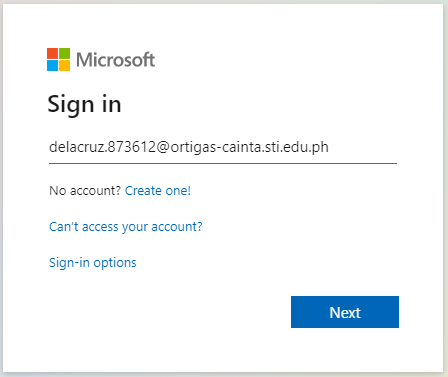
STI Microsoft O365 Login credentials format:
Username: [Last name . last six digits of student number@campus.edu.ph]
Password: Last name + birthdate (YYYYMMDD)
Sample:
Username: delacruz.873612@ortigas-cainta.edu.ph
Password: Delacruz19900422
*Passwords are case sensitive, so make sure you enter it with the first letter of your last name in UPPERCASE.
 |
.png?lmsauth=79ac909e9b8f9aad15f8a48ab5d65671e3e3d64f) |
If you're a new student and you can't login using the Microsoft Office 365 login credentials from your RAF, please contact your school to term activate your account.
STI Student Support link:
https://www.sti.edu/support.asp
I forgot my password
You can reset forgotten passwords via ‘Forgot password?’ in the login page. For other STI Microsoft O365 password related concerns, you may contact elms@sti.edu.
I have missing subjects
Please inform your school to update your class assignment. Further, you may send an email at elms@sti.edu.
I don’t know my eLMS login credentials
For your eLMS login credentials, you may coordinate with your Academic Head.
I don’t have any assigned courses
Please inform your Registrar or school to update your PSCS class assignment.
I have missing students in my courses
You can manually enroll students via People picker or provide them with the course access code for self-enrollment.
I don’t know my login credentials
You can login your eLMS account using the format below:
eLMS Parent Username: Child’s Student ID number_parent
eLMS Parent Password: Child’s Last name + child’s birthdate (YYYYMMDD)
Sample:
Username: 2000210838_parent
Password : Delacruz19900422
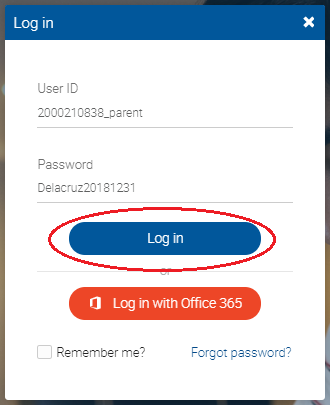
*Passwords are case sensitive, so make sure you enter it with the first letter of your last name in UPPERCASE.
For other eLMS concerns, you may send an email to elms@sti.edu.